

If a collar has been in storage for several months, we recommend checking that it is working properly before putting it back on an animal.
How to check if the collar works
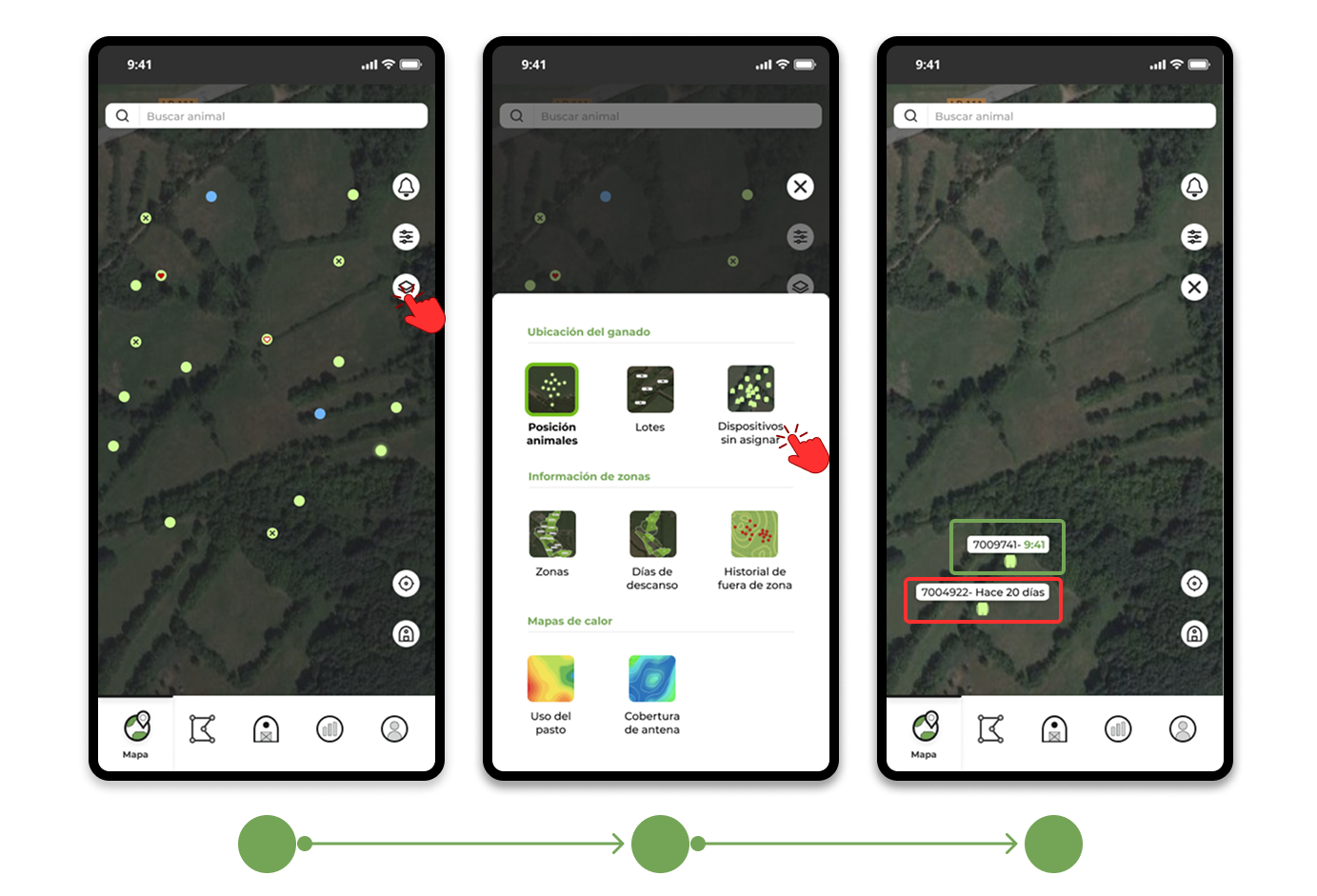
Access the "Unassigned Devices" layer in the app.
In this layer you can check the condition of the collar without having to previously assign it to an animal:
- If the device appears correctly on the map and the time of the last position is shown in green, it means that it has reported a GPS position for the last 2 hours and can now be used normally.
- If your device doesn't appear on the map or the time of the last position is black, perform the checks below.
Additional checks
1. Check the location of the collar
Is the collar on the outside and well oriented (with the part curved upwards)? Incorrect orientation or lack of visibility of the sky can prevent obtaining a GPS position.
2. Check coverage
Is the collar within the coverage range of an Ixorigue antenna?
3. Separate the devices
Has it been stored together with other collars? When several devices are in close proximity to each other, interference can occur. We recommend separating them during the test.
If the problem continues
If, after reviewing the points above, the time still appears black after two hours, please contact support.
Our team will be able to check if the device needs to be updated using the Ixo Connect app, restart it, or send it for service.