

In the Ixorigue app, you can register animals using three different methods:
- Registration via DIB reader
- Registration by import (Click here to watch this tutorial)
- Individual animal registration (Click here to watch this tutorial)
Registration via DIB reader
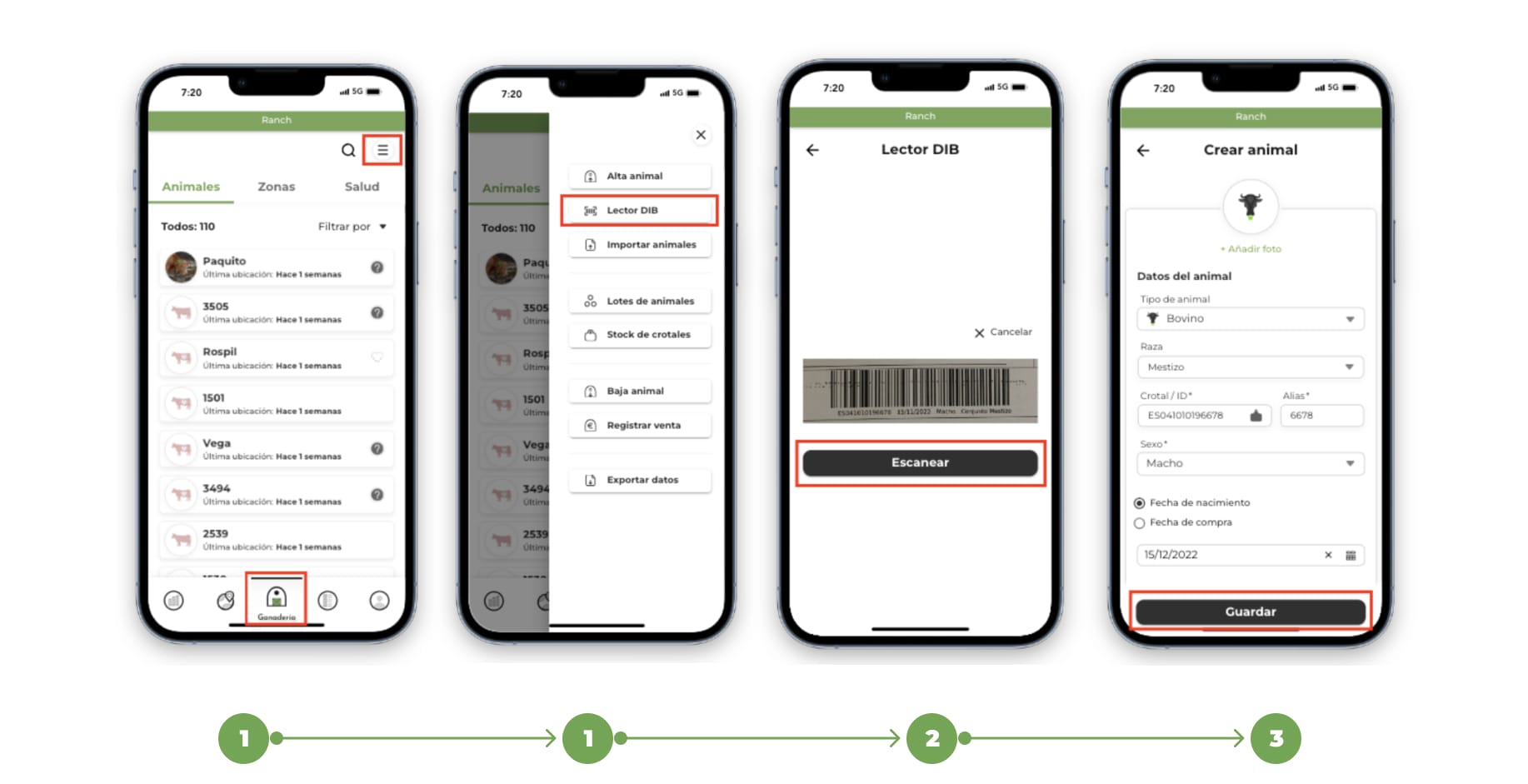
1. Go to the "Livestock" section and click on the "Menu" button located in the upper right corner. Select the "DIB Reader" option.
2. When you click on DIB Reader:
On mobile:
- The scanner will be opened directly using the mobile camera.
- Accurately focuses the barcode of the document to capture it correctly.
On desktop:
- Tap "Choose from Gallery" and select a photo from the DIB code from your gallery.
- Adjust the photo by centering the barcode inside the rectangle and press the "Save" button.
3. If the DIB code is read correctly, the "Animal registration" form will automatically open with the code data already loaded.
Review the data, add additional information if you consider it necessary and press the "Save" button to complete the registration.
For alternative methods, you can follow the links indicated to learn how to register by data import or individual registration