

The Estrus event allows you to record the date on which a female's heat is detected, making it easier to control her reproductive cycle. Once registered, the application will send reminders every 21 days to inform about the next heat, until a pregnancy event is recorded.
Record a heat event from the animal's file
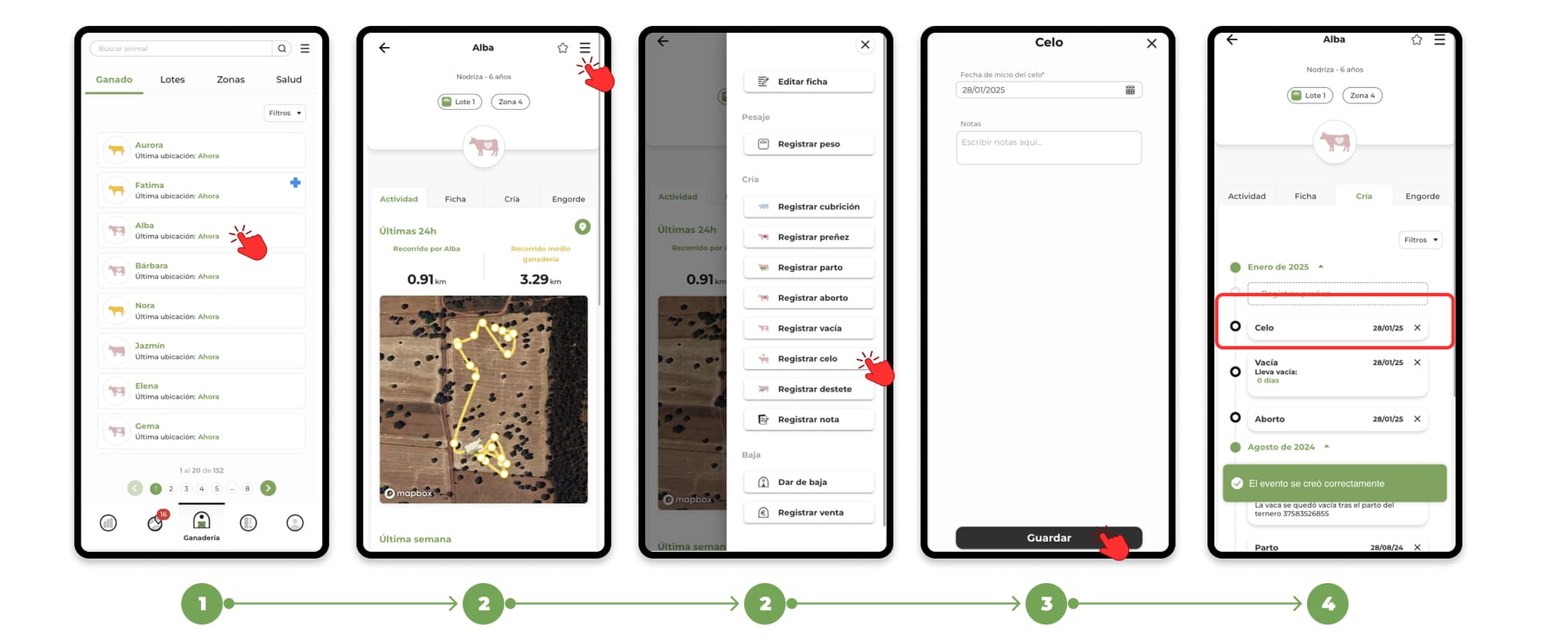
1. Go to the "Livestock" section and Search for the animal you want to register the event for and select its file.
2. Within the animal's file, click on the menu located in the upper right corner. In the drop-down menu, select the option "Register heat".
3. When you click on register heat, the form to add the event will open, fill in the necessary data and press "Save" to register the event.
4. You will be able to see the events recorded in the "Breeding" section of the animal file
How Celo's event works
- Automatic cycle tracking:
- When recording the heat event, the app establishes a cycle of 21 days from the date recorded, notifying when the animal is estimated to go back into heat.
- This cycle will remain active until a pregnancy event is recorded, at which point reminders will stop.
- Task Schedule:
- Automatic reminders will appear in the task schedule, helping to manage the reproductive control of the females.
To learn more about the task schedule, click here.
- Event Visualization:
- The heat event will be recorded in the "Breeding" section of the animal's file, allowing a complete history of reproductive monitoring.