

Recording a mating event in the app allows you to keep track of mating in relation to pregnancies and get statistics on the fertility of your animals. If you include the identification of the male, it will also be automatically recorded in his history, facilitating efficient management of reproductive status. Here's how to record a mating event step by step.
Record a mating event from the animal file
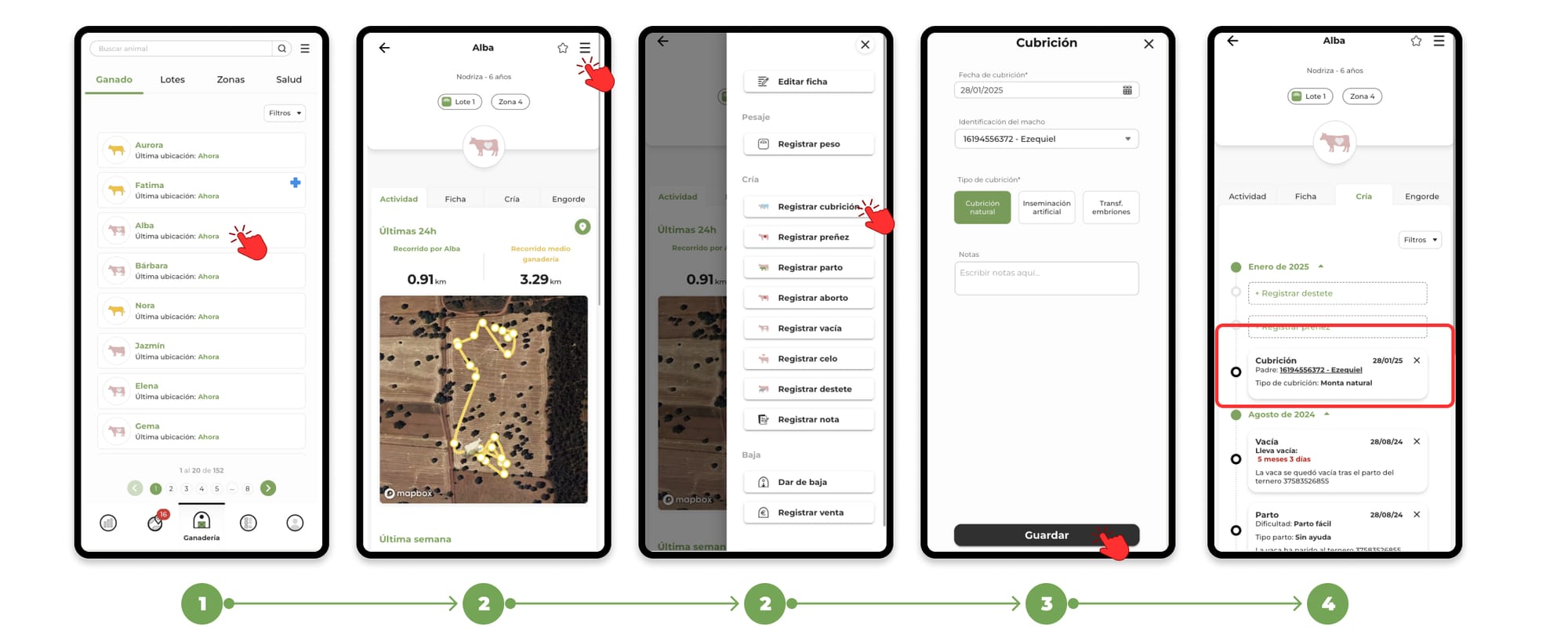
1. Go to the "Livestock" section and Search for the animal you want to register the event for and select its file.
2. Within the animal's file, click on the menu located in the upper right corner. In the drop-down menu, select the option "Register Covering".
3. When you click on register coverage, the form to add the event will open.
4. Fill in the necessary data and press "Save" to finish the registration. You will be able to see the events recorded in the "Breeding" section of the animal's file
How the Coverage Event Works
- If you include the male's ID in the form, the app will automatically create a mating event in his schedule with the same data recorded, ensuring that both animals are correctly linked.
- Recording this event will help to get fertility statistics from your farm.