Over time, the animals' daily activity and growth can cause collars to loosen and devices to move, rotate, or flip. When this happens, the internal antenna is no longer facing the open sky and GPS signal reception is affected.
In the app this is usually noted as:
- Inaccurate positions or loss of position on the map
- Lower device communication frequency
- Miscalculated routes and distances
- Alerts that are not generated correctly
If you notice any similar problem, before contacting support, always check the placement of the collar. It is the most frequent cause and ruling it out helps to solve the problem faster.
Cows and horses
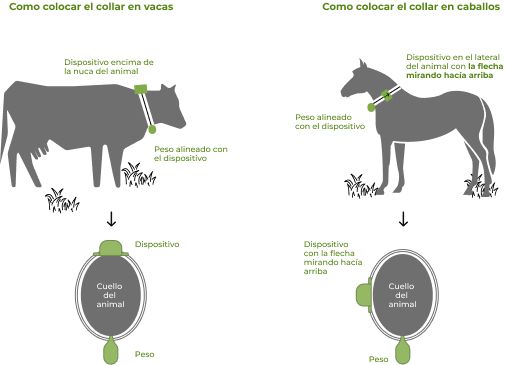
In large animals, the device is mounted on a collar with a counterweight. The counterweight is what keeps the device facing the sky, so the device should always be on the upper half of the neck.
The counterweight has broken or fallen off
If the animal receives a blow and the counterweight comes off, the weight of the device itself drags the collar until it rotates and remains in the throat, pointing to the ground. In that position, the GPS connection is very compromised.
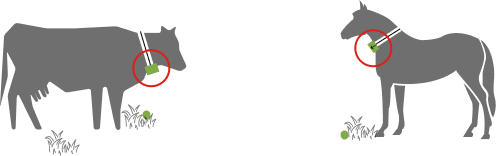
What to do: Check the counterweight. If it is missing or damaged, contact our support department to replace it. Once replaced, leave the device back on the upper half of the neck.
The device has flipped over
When an animal scratches against a tree or pole, the device can flip over and be left with the curved part against the skin. The antenna loses orientation to the sky and the signal weakens.
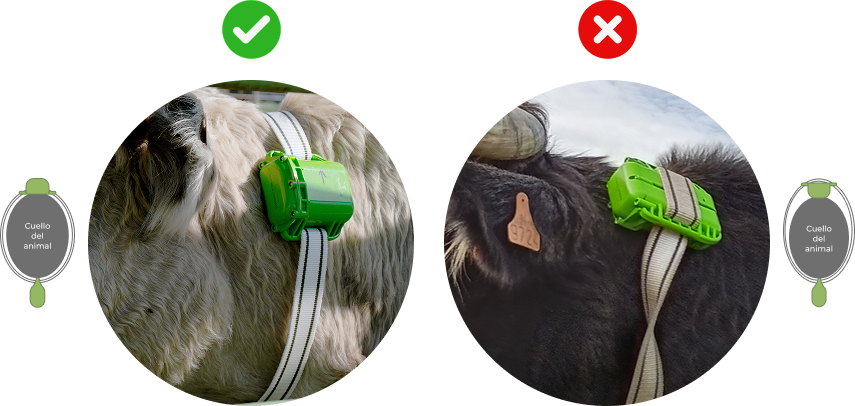
How to Operate: Rotate the device to its original position, with the curved part facing outwards.
Sheep and goats
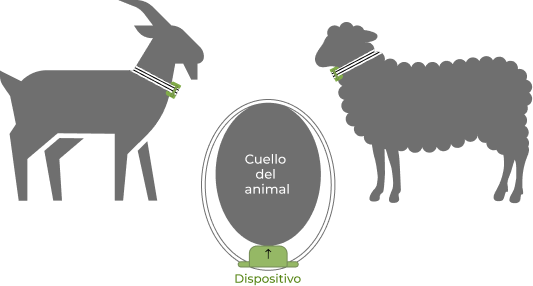
In small animals, the collar is mounted without a counterweight and the curved part must be in contact with the throat
The opposite of cows and horses