

Follow this guide to prepare the connectivity kit, install the antenna, connect the router, and check that everything works. A good installation ensures good coverage and keeps your CowPro devices connected.
Before you begin
Before going to the installation point, check that the kit is complete and in good condition. The kit includes:
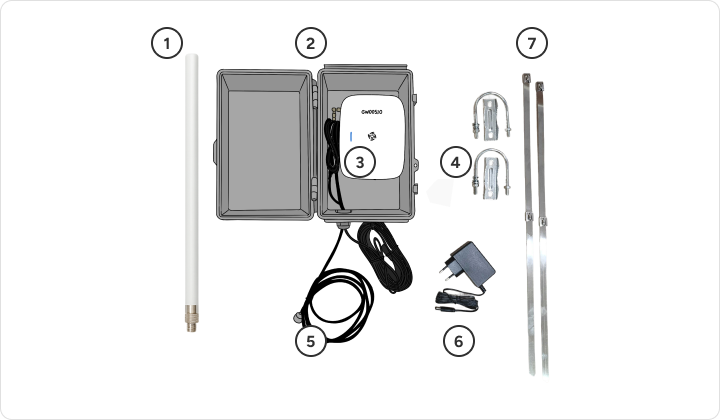
Pre-checks
- The installation point has an internet connection and a power outlet.
- The location allows the antenna to be installed at a minimum height of 3 meters and oriented correctly.
- When you connect your router to power, the blue LED flashes.
1. Install the antenna
The location and orientation of the antenna are key to good coverage.
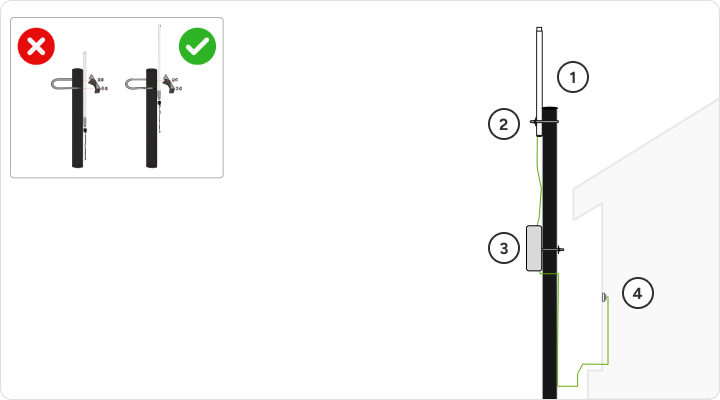
- Place the antenna on the pole, at a minimum height of 3 meters, oriented according to the coordinates indicated by the CowPro team and fix it with the clamps of the kit.
- Connect the antenna to the router with the antenna cable, making sure the joints are tight.
- Place the router box in a safe and stable place, and attach it to the pole with the metal cable tie from the kit.
- Connect the power cord to the router and plug it into power.
Check that all connections are snug and that there are no loose wires.
2. Check that it works
On the router
- It is connected to the mains.
- The blue LED keeps flashing.
- The connections between the antenna, the router and the power are well done.
In the CowPro app
- Open the CowPro app and look for the antenna on the map. Look at the color of the icon:
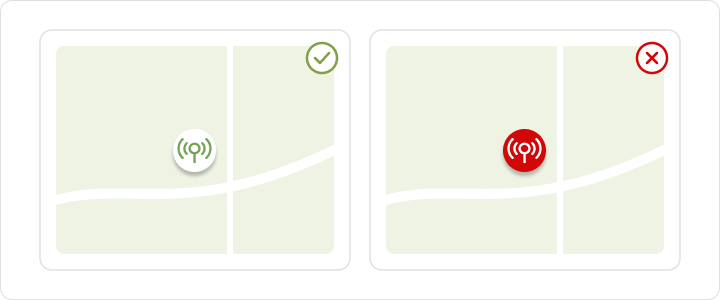
- White icon: The antenna appears correctly on the map.
- Red icon: Check the installation and contact the CowPro team to check its operation.
3. Validate the installation with the CowPro equipment
When you finish the installation and checks, contact the CowPro team. Our technical team will verify that the kit is properly installed and that the system is working properly.
Do not finish the installation until the technical team confirms it.
Need help?
If you have any questions during the preparation or installation of the kit, please contact the CowPro support team.