

Alerts alert you when an animal needs your attention. They're automatically generated from the data sent by the devices (GPS position and activity), so you'll only receive them for animals that have an associated device.
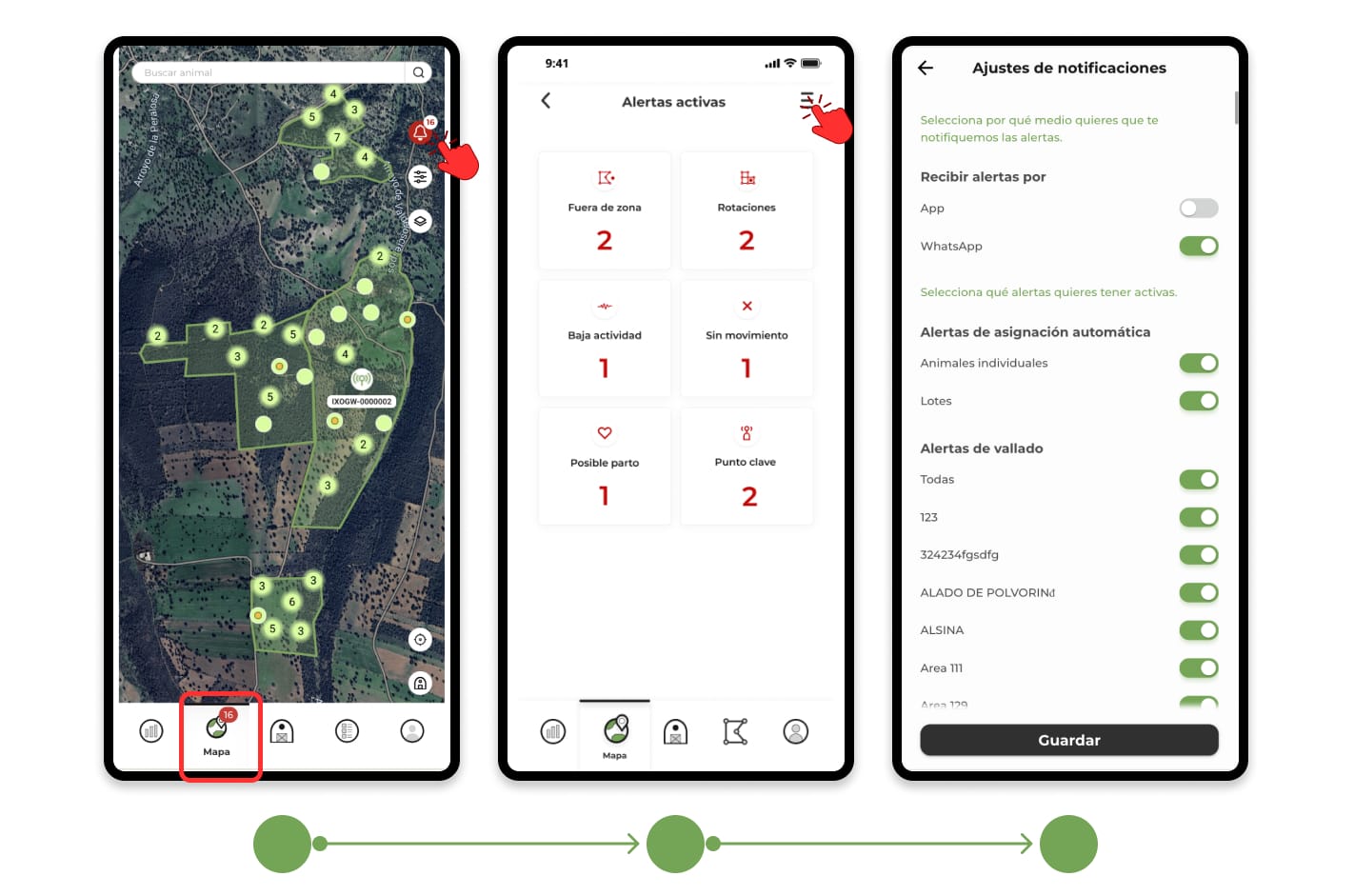
Where to view your alerts
All your alerts are on the bell icon on the map. Pressing it opens the list of alerts, from where you can check the details of each warning and access the affected animal.
In addition to the app, you can receive alerts as a notification on your mobile or WhatsApp. You can choose the channels in the notification settings.
Types of alerts
- Out of Zone and Out of Perimeter
- Rotations
- No movement
- Low activity
- High activity
- Possible delivery
- Key points
- Tips to make your alerts reliable and working properly.
1.Out of Zone and Outside Perimeter
What it tells you: an animal has left the grazing area assigned to it or the perimeter of the farm.
How it works: To avoid false warnings due to GPS inaccuracies, the alert only goes off when the device registers several positions in a row outside the area and at a sufficient distance from the edge. The first time an animal goes out, the device sends extra positions for a few minutes to confirm it as soon as possible.
When confirmed, the animal appears in red on the map and you receive the warning. If it re-enters, you will receive a return notice with the time it was away.
When it doesn't jump:
- If the zone is disabled.
- If the animal has left its area but is still within the perimeter of the farm. In that case it is considered a safe movement (see Rotations).
- If the animal has moved to another area of your farm.
2. Rotations
What it tells you: An animal or a lot has changed its zone, or has left its zone to an undemarcated area within the perimeter.
How it works: When the system detects the change, it checks for a few hours that most of the positions (or devices in the batch) are already in the new zone. Meanwhile, the source zone appears with a green border and a white background, with the status zone change in progress. When confirmed, the app automatically assigns the animals to their new zone and you receive the notification.
3.No movement
What it tells you: An animal hasn't moved for several hours.
How it works: the device measures the animal's movement (from the neck on the collar or from the ear in the caravan). If it goes more than 4 hours without registering movement, you receive the alert with the hours it has been stationary. We recommend that you check it as soon as possible.
If your devices are of an older model without an accelerometer, this alert works differently: it triggers when, during the last 24 hours, their positions have been concentrated in the same point and there has been no displacement
4. Low activity
What it tells you: an animal has moved much less than usual.
How it works: Every day, the system compares the distance traveled by each animal in the last 24 hours with its weekly average and that of the rest of your farm. If the difference is very marked, you receive the alert. The low activity warning arrives grouped, with the number of animals affected, and in the app you can see the list with the details of each one.
If you're locking animals on purpose, such as in a pen or chute, you can temporarily turn off low-activity alerts so you don't get unnecessary warnings.
5. High Activity
What to warn: an animal has traveled much farther than usual.
How it works: it works the same as the low activity alert, but in the opposite direction. Each day, the system compares the distance traveled by each animal in the last 24 hours with its weekly average and that of the rest of your livestock. If the difference is very marked, you receive the alert. The high activity warning arrives grouped, with the number of animals affected, and in the app you can see the list with the details of each one.
6. Possible delivery
What it warns you: A pregnant female could be in labor.
How it works: The alert is only activated in females with a recorded pregnancy event. It jumps when its activity drops sharply from its average and, in addition, its position remains separate from the rest of the group. If the expected date of delivery is still far away, the warning will tell you, because it could be another problem that should be checked.
Important: To receive this alert, keep your reproductive events up to date.
7. Key points
What it warns you: if the animals pass or stop passing through a specific point on the farm, such as a drinking trough, a feeder or a chute.
How it works: This alert is available if you have Scan devices installed in your farm. For each key point, you can choose whether you want to be notified when the animals don't pass through it or when they do. The app also records how much time they spend on it.
On the map, animals detected at a key point are shown in the position of the point itself, so they will appear grouped in the same place.
Tips to make your alerts reliable
- Draw your areas well: avoid overlapping and leave the minimum space undefined between them.
- Check coverage: If a device stops giving signal, departures or zone changes cannot be confirmed until it recovers it.
- Put enough devices in each batch: With few devices, the system has less information to confirm batch movements.
- Record pregnancies with the most accurate date possible: this way the alert of possible delivery will be more reliable. If you later do a scan, an ultrasound or any other check-up that gives you a more exact date, update it in the pregnancy event.
- Associate each device when it is already placed on the animal: this way its activity data will reflect only the actual movements of the animal.