

The Ixorigue map allows you to organize and control your farm in a simple way. Here you will learn how perimeters, pasture areas and automatic animal assignment with an assigned GPS device work.
1. Draw your farm and areas
On the map you can delimit two main elements:
The perimeter of your farm [(See how to create and edit a perimeter)]
- Define the boundaries of your property.
- Everything that remains inside will be considered a "safe" space.
- When an animal leaves that perimeter, the app will notify you with an "out of perimeter" alert.
Pasture Zones [(See how to create and edit an area)]
- They are drawn within the perimeter.
- They allow you to control which area the animals are grazing in.
- In addition, they generate a history of use and rest, including the livestock load in each use.
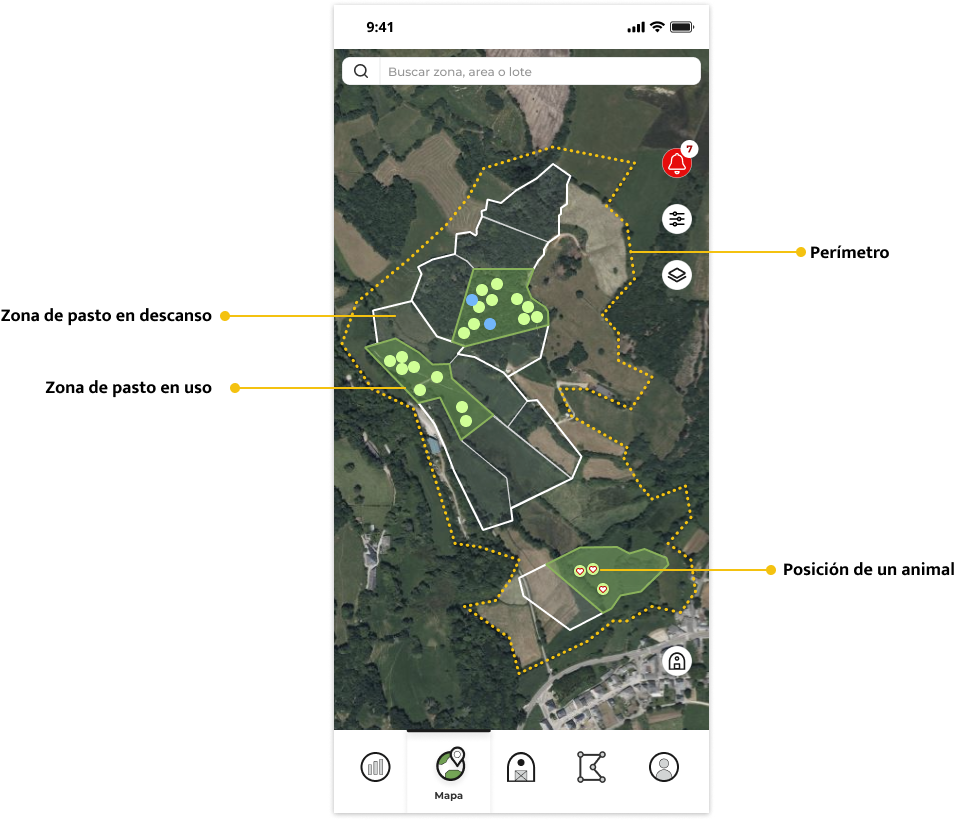
👉 Tip: Avoid overlapping areas and try not to leave empty gaps between them.
2. Automatic Animal Assignment with GPS
Animals with a GPS device are automatically assigned to the grazing area in which they are located.
a) Individual animals (without batch)
- The system analyzes various positions of the animal.
- If you accumulate enough records within a new zone over a period of up to 3 hours, the change is confirmed.
- Once confirmed, you will receive a notification that the animal has changed zone.
b) Batch of animals
- The positions of several animals in the group are reviewed.
- The change is confirmed when at least 60% of the animals with an assigned device remain in the new zone for a period of up to 4 hours.
- Once confirmed, you will receive a notification that the batch has changed zone.
⚙️ Note: Trial periods can be configured according to your needs.
3. Manual Assignment
If you have animals or lots without GPS devices assigned:
- They are not automatically assigned.
- You can assign them manually from the menu in the zone tab.
4. What happens if an animal leaves the area?
- Within the perimeter → the animal or lot is marked as "no assigned zone".
- Outside the perimeter → You will receive an "out of perimeter" alert and the animal will appear in red on the map.
- No perimeter drawn → Pasture areas are considered the only safe areas. When exiting them, an "out of zone" alert will be generated and the animal will appear in red on the map.
👉 The app always checks several positions before sending the alert, to avoid false warnings.
5. Check alerts and notifications
All alerts and notifications are recorded.
To view them, click on the bell on the right of the map.
6. Important recommendations
- Make sure you have enough devices per batch – the more, the more reliable you are when confirming zone changes.
- Keep the areas well defined and avoid overlapping areas.
- Avoid leaving empty spaces between the areas if they are joined.
The map of Ixorigue doesn't just show the location of your animals:
- Automatically confirms zone changes.
- Warns you of leaks or perimeter exits.
- It gives you a clear, orderly and reliable view of what's going on in your farm.
Explanatory video of the operation of zones, perimeters and zone changes.